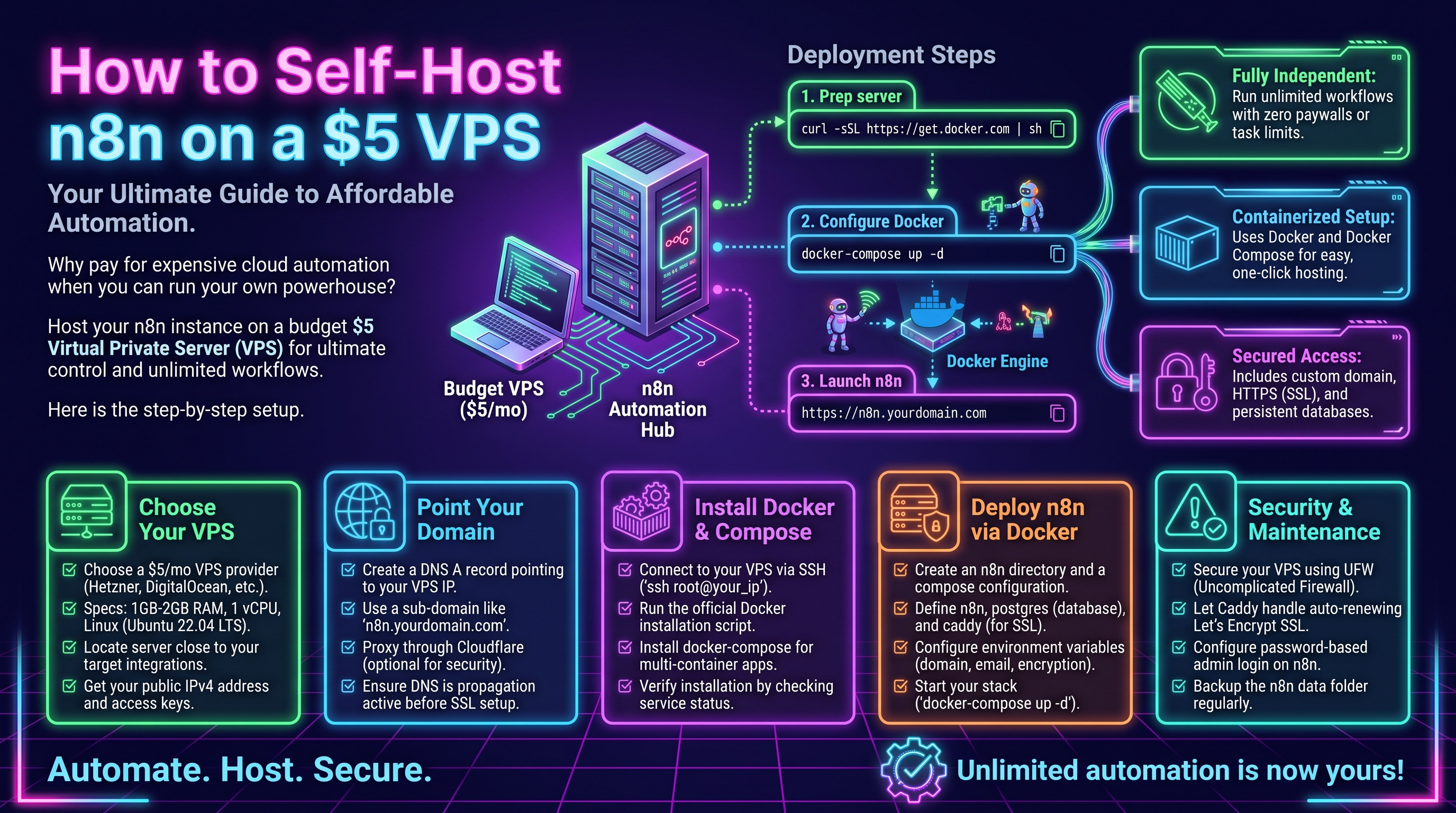
Why Self-Host n8n?
n8n's cloud plans start at $20/month for 2,500 executions and scale steeply from there. A $5/month VPS from Hetzner, DigitalOcean, or Contabo runs the same software with unlimited executions. For a small business running a few thousand workflow executions a month, self-hosting cuts automation costs by 80-90%. You also keep your data on your own server — no third party sees your customer records. If you are new to the trade-offs, read our n8n self-hosted vs cloud comparison first.
What You Need
- A VPS with at least 1 vCPU and 2 GB RAM (4 GB is safer for production). Hetzner's CX22 (~$4.50/mo) or DigitalOcean's basic droplet ($6/mo) both work.
- Ubuntu 22.04 LTS installed
- A domain or subdomain pointing at the server IP (for HTTPS)
- About 45 minutes
Step 1: Initial Server Setup
SSH into your fresh server and update everything:
apt update && apt upgrade -y
adduser n8n --disabled-password
usermod -aG sudo n8n
Then lock down SSH: copy your public key to /home/n8n/.ssh/authorized_keys, and in /etc/ssh/sshd_config set PasswordAuthentication no. Restart SSH with systemctl restart sshd. (See our full VPS hardening guide for the complete checklist.)
Step 2: Install Docker
curl -fsSL https://get.docker.com | sh
usermod -aG docker n8n
apt install docker-compose-plugin -y
Log out and back in so the group change takes effect, then verify with docker run hello-world.
Step 3: Deploy n8n with Docker Compose
Create a directory and a docker-compose.yml:
mkdir -p ~/n8n && cd ~/n8n
cat > docker-compose.yml <<'EOF'
version: "3.8"
services:
  n8n:
    image: n8nio/n8n:latest
    restart: unless-stopped
    ports:
      - "127.0.0.1:5678:5678"
    environment:
      - N8N_HOST=n8n.yourdomain.com
      - N8N_PORT=5678
      - N8N_PROTOCOL=https
      - WEBHOOK_URL=https://n8n.yourdomain.com/
      - GENERIC_TIMEZONE=America/New_York
    volumes:
      - n8n_data:/home/node/.n8n
volumes:
  n8n_data:
EOF
docker compose up -d
Replace n8n.yourdomain.com with your real subdomain. The volume n8n_data persists your workflows and credentials across restarts and upgrades — never run n8n without it.
Step 4: Add HTTPS with Caddy
Caddy is the simplest reverse proxy because it provisions Let's Encrypt certificates automatically:
apt install caddy -y
cat > /etc/caddy/Caddyfile <<'EOF'
n8n.yourdomain.com {
    reverse_proxy 127.0.0.1:5678
}
EOF
systemctl reload caddy
Wait a minute, then open https://n8n.yourdomain.com — you should see the n8n setup screen with a valid certificate. Create your owner account and you are live.
Securing Your n8n Instance
Three things before you call the setup done. First, set an explicit encryption key. n8n generates one on first run and stores it inside the volume — but if you ever restore a backup to a fresh volume without it, every stored credential comes back as unreadable garbage. Generate one now and add it to your compose file:
- N8N_ENCRYPTION_KEY=9f2c7a1e4b8d3f6a0c5e8b2d7a1f4c9e6b3d8a0f2c5e7b1d4a8f3c6e9b2d5f8a1Generate yours with openssl rand -hex 32, and save it in your password manager — not just on the server. If the server dies, the compose file dies with it. Second, firewall: with UFW, allow only SSH (22), HTTP (80), and HTTPS (443). n8n's port 5678 stays bound to localhost behind Caddy and is never public. Third, use a strong owner-account password — this instance will hold API keys to your business tools, so treat it like production from day one.
Step 5: Backups (Don't Skip This)
Your workflows live in the Docker volume. Back it up nightly:
docker run --rm -v n8n_n8n_data:/data -v ~/backups:/backup \
  alpine tar czf /backup/n8n-$(date +%F).tar.gz /data
Sync ~/backups to S3 or another server with rclone or rsync. Also export workflows from the n8n UI monthly as JSON — belt and suspenders.
Restoring from a Backup (Practice This Once)
A backup you've never restored is a hope, not a plan. The restore takes five minutes — do it once so you're calm when it counts:
cd ~/n8n && docker compose down
docker run --rm -v n8n_n8n_data:/data -v ~/backups:/backup alpine   sh -c "rm -rf /data/* && tar xzf /backup/n8n-2026-10-18.tar.gz -C /"
docker compose up -d
The critical detail: N8N_ENCRYPTION_KEY must match the one in use when the backup was taken, or all API credentials decrypt to garbage. This is the #1 restore failure, and it's why the key lives in your password manager. Verify quarterly: restore to a throwaway container, log in, open a workflow. Monthly JSON exports from the n8n UI are your second layer — they import into any n8n instance even if a volume backup turns out corrupt.
Updating n8n
Updates are one command, run monthly:
cd ~/n8n && docker compose pull && docker compose up -dCheck the n8n implementation service page if you would rather have professionals handle hosting, updates, and workflow design for you.
Pinning Versions for Safe Updates
n8nio/n8n:latest is convenient and mildly dangerous — one docker compose pull can jump you across a breaking change. For anything beyond a homelab, pin the version: image: n8nio/n8n:1.109.2. Update deliberately: read the release notes for breaking changes, update a staging copy (or a server snapshot) first, then production.
The safe cadence: update monthly, one or two versions behind latest, never on a Friday afternoon. Before updating, take a backup — you have the script now — note the current version, and keep the previous image tag handy so rollback is a one-line compose change instead of a panicked restore. If an update breaks a workflow, n8n's executions list shows exactly which node failed — check there before assuming the worst.
The Math
A team running 20,000 executions/month pays roughly $50-100/month on n8n Cloud or far more on Zapier. Self-hosted: $5/month plus an hour of setup and 15 minutes of maintenance a month. The break-even point is essentially immediate — which is why self-hosting is the default recommendation for anyone comfortable with a terminal.
Choosing a VPS Provider
Not all $5 servers are equal. Hetzner offers the best price-to-performance (2 vCPU / 4 GB RAM around $5/month in EU/US regions) but has fewer regions. DigitalOcean costs slightly more for similar specs but has excellent documentation and a simpler firewall UI. Contabo is cheapest per GB of RAM but has a reputation for slower support. For n8n, prioritize RAM over CPU — 2 GB is the minimum for comfort, 4 GB if you run Postgres alongside. Check current pricing before buying; the VPS market moves fast.
SQLite vs Postgres
The compose file above uses SQLite (n8n's default), which is fine up to tens of thousands of executions per month. If you outgrow it — slow UI, database locks — switch to Postgres using the compose example in our Docker guide. Migration is straightforward: export workflows as JSON, point n8n at Postgres, re-import. Most small businesses never need to switch.
Tuning n8n for 2 GB of RAM
A $5 VPS is cozy, and n8n's defaults assume more headroom. Four settings keep it happy. Prune execution data — the #1 disk and RAM eater:
- EXECUTIONS_DATA_PRUNE=true
- EXECUTIONS_DATA_MAX_AGE=168
- EXECUTIONS_DATA_PRUNE_MAX_COUNT=5000
Store binary data on disk with N8N_DEFAULT_BINARY_DATA_MODE=filesystem — workflows handling PDFs or images will OOM without this. Cap the container's memory so one runaway workflow can't take down the whole box (deploy.resources.limits.memory: 1.5G in compose). Rotate Docker logs: add "log-opts": {"max-size": "10m", "max-file": "3"} to /etc/docker/daemon.json, or a chatty workflow's logs will quietly fill your disk within a month. Watch docker stats for a week after going live — if n8n idles above 1 GB, it's time for the 4 GB plan or Postgres.
Troubleshooting Common Issues
- Webhooks return 404:
WEBHOOK_URLmust exactly match your public URL includinghttps://and trailing slash. This causes 80% of self-hosting headaches. - n8n won't start / OOM kills: check
docker logs n8n— usually insufficient RAM. Upgrade to 4 GB. - Certificate errors: Caddy needs ports 80 and 443 reachable. Verify DNS points at the server with
dig n8n.yourdomain.com. - Workflows lost after update: you forgot the volume. Always verify
docker volume lsshows your data volume before upgrading.
Monitoring: Know Before It Breaks
Nobody watches a $5 VPS — so make the VPS watch itself. A free Healthchecks.io ping (or self-hosted Uptime Kuma) at the end of a daily "am I alive" workflow tells you within 24 hours if n8n stopped. Add a cron job that alerts when disk usage passes 80% — full disks are the most common cause of mysterious n8n deaths, and a weekly df -h email is enough to catch it.
Watch the two numbers that matter: free RAM and Docker volume size (docker system df). Set N8N_LOG_LEVEL=warn to keep logs useful instead of noisy. Fifteen minutes of monitoring setup turns "the automations have been down for two weeks and nobody noticed" into a Slack message the morning it happens.
FAQ: Self-Hosting n8n on a $5 VPS
Is 2 GB RAM really enough for n8n?
For light-to-medium use — a few dozen workflows, thousands of executions a month — yes, with execution pruning and binary-data-on-disk enabled. Heavy file processing, AI workflows with large payloads, or 50k+ executions a month want 4 GB. Start at 2, watch docker stats for two weeks, and upgrade if idle usage stays above 1.2 GB.
Can I run other apps on the same VPS?
Yes — that's the point of Docker. n8n + Postgres + Caddy + a small static site fit comfortably on 4 GB. Give each service a memory limit so one can't starve the others, and keep n8n's port bound to localhost behind the reverse proxy.
What happens to my workflows during a provider outage?
Workflows pause; nothing is lost as long as the volume survives — and volumes persist across reboots. Missed schedule triggers don't backfill by default, so check the executions list after any downtime. This is exactly what the nightly off-server backup is for.
Should I just use n8n Cloud instead?
Under ~2,500 executions a month with zero interest in maintenance, Cloud's $20/month is reasonable. Past that volume — or when data must stay on your own infrastructure — self-hosting wins on cost and control. Many teams prototype on Cloud and migrate to a VPS once their workflows stabilize.
Want n8n running without the DevOps? Contact OctaTechno — we deploy, secure, and maintain self-hosted n8n instances and build the workflows on top.