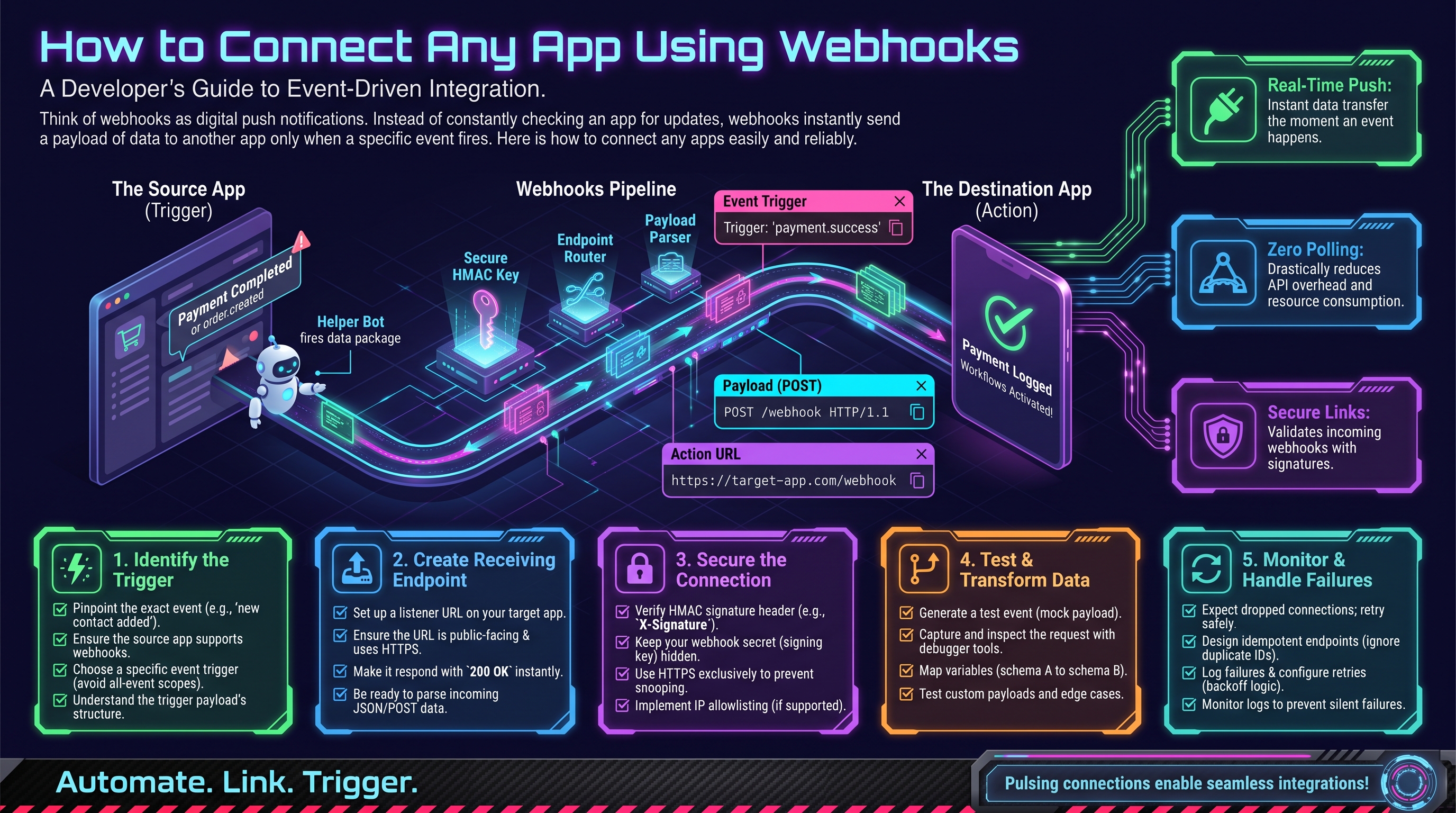
What Is a Webhook?
Normally, to know if something happened in another app, you'd have to keep asking: "Any new orders? Any new orders? Any new orders?" That's polling — inefficient and slow. A webhook flips it around: the app tells you the moment something happens by sending an HTTP request to a URL you provide.
Think of it like the difference between refreshing your inbox every minute versus getting a push notification. Webhooks are the push notification of the API world.
How Webhooks Work (3 Steps)
1. You provide a URL
You give the source app a URL where it should send notifications — for example, https://your-automation.com/webhook/new-order. This URL is your webhook endpoint.
2. You choose events
You tell the app which events you care about: "new order created," "payment failed," "contact updated." Most apps let you subscribe to specific events so you're not flooded.
3. The app sends data automatically
When the event happens, the app POSTs a JSON payload to your URL — instantly:
{
  "event": "order.created",
  "order_id": "ORD-7841",
  "total": 249.99,
  "customer": {
    "name": "Sara Ahmed",
    "email": "sara@example.com"
  }
}
Your endpoint receives this and does something useful: creates a CRM contact, sends a Slack message, updates a spreadsheet.
Receiving a Webhook in Python
A minimal webhook receiver is surprisingly short with Flask:
pip install flaskfrom flask import Flask, request
app = Flask(__name__)
@app.route("/webhook/new-order", methods=["POST"])
def new_order():
data = request.json
print(f"New order {data['order_id']} for ${data['total']}")
# TODO: create CRM contact, send notification, etc.
return {"status": "received"}, 200
app.run(port=5000)In production you'd deploy this somewhere with a public URL — but for most businesses, there's a far easier path.
The Easy Path: No-Code Webhook Receivers
Platforms like n8n give you a webhook URL with one click — no servers, no Flask, no deployment. You paste the URL into the source app, and build the rest of your workflow visually. Our beginner's guide to n8n webhooks walks through the entire setup.
Testing Webhooks
Before wiring up real systems, test with webhook.site — it gives you a temporary URL and shows you exactly what the source app sends. This is invaluable for understanding the payload structure before you build anything.
Securing Your Webhooks
An open URL that triggers actions in your business is a target. Protect it:
- Verify signatures. Serious apps sign their webhook payloads with a secret key. Always verify the signature before acting on the data.
- Use HTTPS only. Never accept webhooks over plain HTTP.
- Keep URLs unguessable. Include a random token in the path:
/webhook/a3f9k2-new-order. - Respond fast, process slow. Return 200 immediately, then process the payload in the background — otherwise the sender may retry and you'll process duplicates.
- Handle duplicates. Use the event ID to ignore redeliveries; network retries are normal.
What Can You Build?
- New Shopify order → create invoice in accounting + notify the warehouse on Slack
- New lead in Facebook Ads → add to CRM + send instant WhatsApp follow-up
- Payment failed in Stripe → create support ticket + email the customer
- Form submission → enrich the contact + assign to a salesperson
If your apps support webhooks (most do), real-time automation is within reach. Need help architecting webhook-driven workflows across your stack? OctaTechno builds exactly these integrations — tell us what you want connected.
Setting Up a Webhook: A Concrete Walkthrough
Let's make it tangible with Stripe (payments) → Slack (notifications):
- In n8n, create a new workflow and add a Webhook trigger node. Set the path to
stripe-payment— n8n gives you a URL likehttps://your-n8n.com/webhook/stripe-payment. - In Stripe Dashboard → Developers → Webhooks, click "Add endpoint" and paste that URL. Select events:
payment_intent.succeededandpayment_intent.payment_failed. - Copy the signing secret Stripe shows you — you'll use it to verify payloads.
- Back in n8n, add a Slack node after the webhook: "Send a message to #payments — New payment of {{ $json.amount }} from {{ $json.customer }}."
- Click "Test" in Stripe to send a sample event, and watch it flow through.
Total time: about 15 minutes. No code written.
Debugging: When Webhooks Don't Fire
- Check the sender's delivery log. Stripe, GitHub, and Shopify all show recent webhook attempts with status codes — start there.
- Verify the URL is public. Webhooks can't reach
localhost. During development, use a tunnel like ngrok to expose your local server. - Confirm the event subscription. The most common mistake: subscribing to
order.createdwhen the app firesorders/create(naming varies by platform). - Check your response code. Return HTTP 200 quickly. Slow endpoints get timed out and retried, causing duplicates.
- Look at the raw payload. Log the full JSON — the field you need is often named differently than you guessed.
Verifying Signatures in Python
Here's how signature verification actually looks (Stripe example):
import hmac, hashlib

def verify_signature(payload: bytes, signature: str, secret: str) -> bool:
    expected = hmac.new(secret.encode(), payload, hashlib.sha256).hexdigest()
    return hmac.compare_digest(expected, signature)
Reject anything that fails verification with a 401 — never process unverified webhook data.
Designing for Failure: Retries and Idempotency
Webhooks fail. Servers restart, networks blip, deploys happen at the worst moment. Good webhook systems are designed around two concepts:
Retries with backoff
Serious senders don't give up after one failed delivery. Stripe, for example, retries a failed webhook over 72 hours with exponential backoff — waiting longer between each attempt. Your job on the receiving side is simple: when you can't process a delivery right now, return a non-200 status (like 500) so the sender knows to retry. Never return 200 for something you didn't actually handle — that tells the sender "all good" and the event is lost.
Idempotency: safe to receive twice
Because retries happen, you will receive some events twice. Idempotency means processing the same event twice has the same effect as processing it once. The standard pattern: store every event ID you've seen, and skip duplicates:
seen_events = set()  # in production, use a database table

def handle_webhook(event):
    if event["id"] in seen_events:
        return {"status": "duplicate_ignored"}, 200
    seen_events.add(event["id"])
    process(event)  # create invoice, send message, etc.
    return {"status": "received"}, 200
This small guard prevents the classic webhook disaster: charging a customer twice because a retry arrived during a slow deploy.
A Production-Ready Receiver, Step by Step
Let's upgrade the minimal Flask receiver from earlier into something you'd actually trust — with signature verification and idempotency built in:
from flask import Flask, request, abort
import hmac, hashlib

app = Flask(__name__)
SECRET = "whsec_your_signing_secret"  # from the sender's dashboard
seen = set()

@app.route("/webhook/orders", methods=["POST"])
def orders():
    payload = request.get_data()
    sig = request.headers.get("X-Signature", "")
    expected = hmac.new(SECRET.encode(), payload, hashlib.sha256).hexdigest()
    if not hmac.compare_digest(expected, sig):
        abort(401)  # reject forged requests
    event = request.json
    if event["id"] in seen:
        return {"status": "duplicate"}, 200
    seen.add(event["id"])
    # TODO: hand off to a background queue (Celery, RQ) for slow work
    print(f"Order {event['order_id']} verified and queued")
    return {"status": "received"}, 200

app.run(port=5000)
Three upgrades over the minimal version: verify (reject forgeries), deduplicate (survive retries), and queue (respond fast, process slow). In production, deploy this behind HTTPS (a reverse proxy or a host like Railway/Render handles TLS for you) and swap the in-memory set() for a database table so duplicates are still caught after a restart.
Monitoring: Catching Webhooks That Fail Silently
The scariest webhook failure isn't an error — it's silence. A misconfigured endpoint or an expired signing secret can mean events stop arriving with nobody noticing until a customer complains. Build these tripwires:
- Heartbeat alert: if you normally receive at least one event per hour, alert when an hour passes with zero. UptimeRobot or a simple cron job can do this.
- Delivery dashboard: log every webhook with timestamp, event type, and your response code. A sudden wall of 500s is visible at a glance.
- Sender-side logs: Stripe, Shopify, and GitHub all show recent delivery attempts and their status codes — check them first when something looks off, before debugging your own code.
- Dead-letter queue: when processing fails after all retries, park the payload somewhere inspectable (a database table, an S3 bucket) instead of dropping it. Review it weekly.
- Error tracking: pipe receiver exceptions to Sentry or similar — a stack trace beats "it just stopped working" every time.
For business-critical flows, monitoring isn't optional polish — it's the difference between a 10-minute fix and a week of missing orders. This is exactly the kind of operational rigor our AI workflow automation engagements include by default.
Reconciliation: Your Safety Net
Even with retries and monitoring, assume some events will slip through. Reconciliation is a scheduled job that compares the source of truth with your system and backfills anything missing:
- Once a day, call the source API (e.g., Stripe's "list charges") for the last 24 hours.
- Compare those IDs against the events your webhook receiver logged.
- For any charge with no matching webhook event, fetch the full record and process it — then investigate why the webhook missed it.
This pattern turns webhooks from "hopefully real-time" into "provably complete": webhooks give you speed, reconciliation gives you certainty. Run it as a nightly cron job or a scheduled n8n workflow; either way, it's cheap insurance for payment and order flows where a missed event means lost revenue.
FAQs
Q: Should I use webhooks or keep polling the API?
A: Use webhooks when the source supports them and you need speed — they're instant and far cheaper in API calls. Poll on a schedule when webhooks aren't available, or as a reconciliation backstop behind webhooks. Our webhooks vs polling comparison walks through the trade-offs in detail.
Q: What happens if my server is down when a webhook fires?
A: Quality senders retry automatically with backoff — Stripe retries for up to 3 days. When your server comes back, the backlog delivers. The danger is misconfiguration (wrong URL, failed signature checks), which looks identical to downtime from the sender's side but never self-heals — that's what monitoring catches.
Q: Can webhooks also send data out from my app?
A: Yes — the pattern works both directions. Your app can fire webhooks when its own events happen (many CRMs and e-commerce platforms do this natively), letting downstream systems react to you in real time.
Q: Are webhooks secure enough for payments?
A: Yes, when done right: HTTPS-only endpoints, HMAC signature verification on every delivery, unguessable URLs, and idempotent processing. Stripe, Shopify, and every major payment processor rely on exactly this stack for production traffic.
Popular Webhook Sources
- Stripe — payments, subscriptions, disputes, payouts
- Shopify — orders, products, customers, inventory
- GitHub — pushes, pull requests, issues, releases
- HubSpot / Salesforce — contact updates, deal stage changes
- Typeform / Jotform — form submissions
- Twilio — incoming SMS, call status
If your critical apps are on this list, real-time automation is straightforward. If they're not, check their API docs — or ask us; we integrate with APIs that don't make it easy.