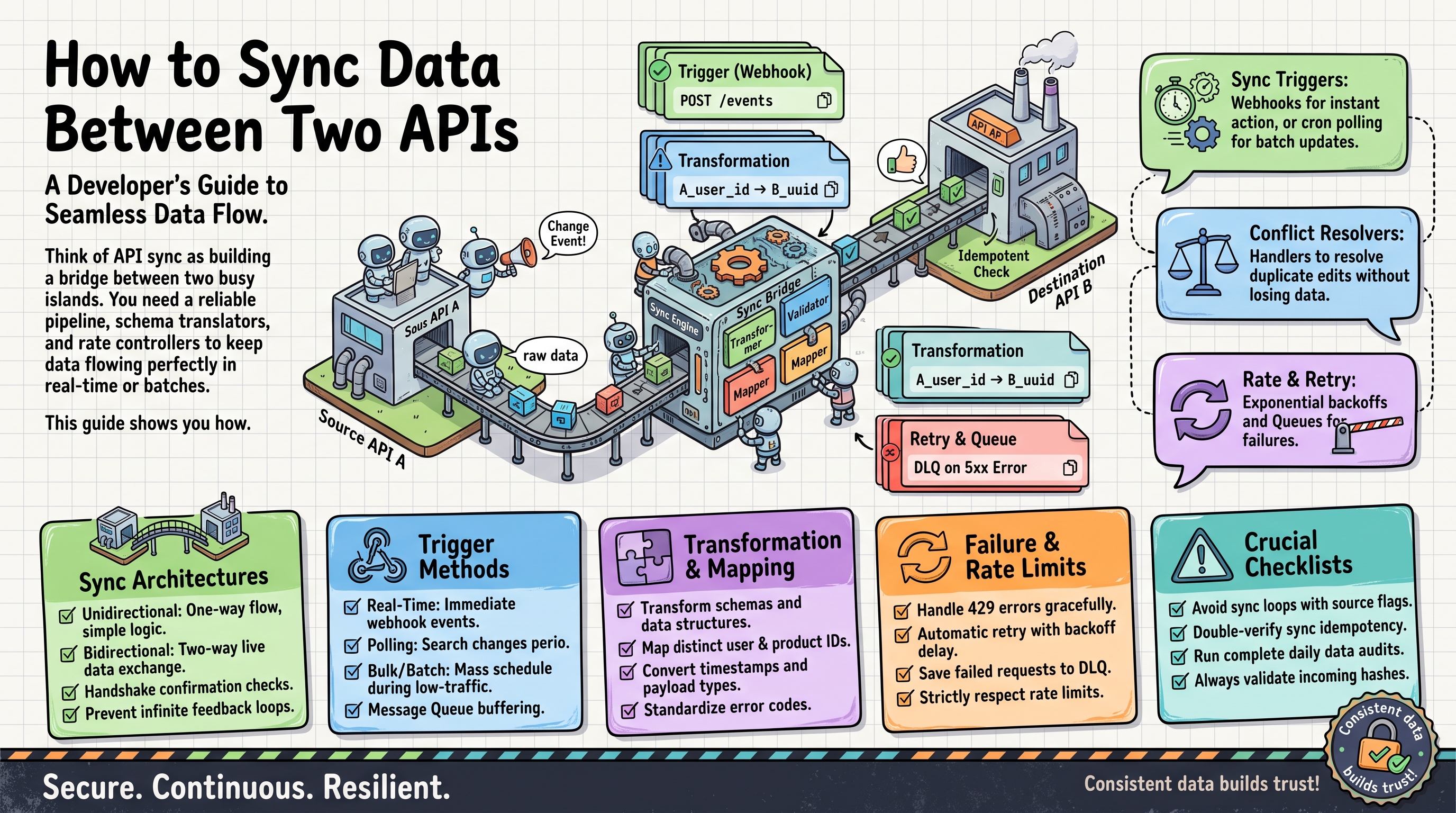
The Sync Problem
Your e-commerce store and your accounting software both track customers — differently. Your CRM and your email tool both track contacts — differently. Keeping them consistent by hand is the kind of work that quietly costs businesses thousands. Syncing via API automates it, but the devil is in the details.
Step 1: Map the Fields
No two APIs name things the same way. Start with an explicit mapping table — in code, a dictionary:
FIELD_MAP = {
    "full_name": "name",        # store -> accounting
    "email_address": "email",
    "phone_number": "phone",
    "total_spent": "lifetime_value",
}

def translate(record):
    return {dst: record[src] for src, dst in FIELD_MAP.items() if src in record}
Keep this mapping visible and documented. When either API changes, this is the one place you update.
Step 2: Prevent Duplicates
The #1 sync bug is creating the same record twice. Before inserting, check whether it exists — match on a stable identifier like email:
def sync_customers():
    source = get_all(API_A, "/customers")
    existing_emails = {c["email"].lower() for c in get_all(API_B, "/customers")}

    for customer in source:
        email = customer["email_address"].lower()
        if email in existing_emails:
            continue  # already there, skip
        create(API_B, "/customers", translate(customer))
        existing_emails.add(email)  # avoid double-adding within this run
Matching Records Without a Shared ID
Email matching covers most cases, but not all. Phone numbers arrive in different formats (+92-300-1234567 vs 03001234567), names have typos, and emails change when people switch jobs. Normalize before you compare: lowercase emails and strip +tags, strip spaces and dashes from phone numbers, trim whitespace everywhere. A tiny normalization function prevents a whole class of false duplicates.
For ongoing syncs, keep a persistent mapping table — your internal ID paired with each system's external ID — updated on every run. After the first match, lookups become exact instead of fuzzy. Fuzzy matching (Levenshtein distance on names) has its place, but use it to flag candidates for human review, never to auto-merge financial records. One team auto-merged two different "Muhammad Khan" contacts and invoiced the wrong one — an expensive lesson in false positives.
Pro tip: match on the most stable identifier the source offers. Stripe's cus_xxx or HubSpot's record ID never changes; emails do. If both APIs let you write a custom external ID, stamp your own key into both systems on first sync and every future run becomes a simple lookup.
Step 3: Sync Incrementally
Pulling everything every time is slow and wasteful. Most APIs support filtering by modification date — only fetch what changed since your last run:
from datetime import datetime, timedelta

last_run = load_last_run_time()  # stored from previous execution
since = last_run.isoformat()

changed = get_all(API_A, "/customers", params={"updated_since": since})
for customer in changed:
    upsert(API_B, "/customers", translate(customer))

save_last_run_time(datetime.utcnow())
This turns a 10-minute full sync into a 10-second incremental one.
Paginating Large APIs
Most APIs return 50-100 records per page, and how you walk those pages matters. Offset pagination (?page=1, ?page=2...) breaks on live datasets: if records are added or deleted mid-sync, rows shift and you skip or double-process them. Prefer cursor-based pagination when the API offers it — you feed back an opaque token until it runs out:
cursor = None
while True:
    resp = get(API_A, "/customers", params={"cursor": cursor, "limit": 100})
    for record in resp["data"]:
        process(record)
    cursor = resp.get("next_cursor")
    if not cursor:
        break
Respect rate-limit headers while you page: read X-RateLimit-Remaining and honor Retry-After on 429 responses instead of hammering. One more pro move — log "pages fetched" per run. A sudden 10x jump usually means your incremental filter silently broke and you're re-pulling the entire dataset every time.
Step 4: Handle Conflicts
What if a contact's phone number changed in both systems? You need a rule, decided upfront:
- Last-write-wins: newest timestamp wins. Simple, usually fine.
- Source-of-truth: designate one system as authoritative per field (CRM owns phone, store owns address).
- Manual review: flag conflicts to a human when the stakes are high (financial data).
Whatever you choose, log every conflict. Silent conflict resolution is how data corruption hides.
Data Transformation Pitfalls
The field mapping is the easy part; the formats are where syncs die. Dates: one API sends 2026-10-18T11:30:00+05:00, another expects 10/18/2026. Parse into real datetime objects, normalize to UTC, then format — never slice strings. Phones: normalize to E.164 with a library like Python's phonenumbers before comparing or storing. Currency: 19.99 in one system vs 1999 cents in another is the classic 100x bug, and it has double-charged real customers. Encoding: strip or normalize unicode before writing to systems that choke on emoji in names — yes, this happens.
The golden rule: validate every record before the upsert. Reject and log records with missing emails, negative totals, or impossible dates. Bad data rejected loudly at the boundary never becomes a mystery inside the destination system. Silent coercion — turning null into 0 — is how accounting reports quietly go wrong.
Step 5: Make It Resilient
- Idempotency: design operations so running them twice is harmless (upsert by email, not blind insert).
- Retries with backoff: transient API failures are normal — retry after 1s, 2s, 4s, then alert.
- Rate limit awareness: pause when you hit 429 responses; getting banned mid-sync is worse than going slow.
- Comprehensive logging: log every create/update/skip with timestamps. When something looks wrong, logs are your only witness.
- Alerting: email or Slack alert on failure — a sync that fails silently for a month is a disaster.
Authentication That Doesn't Break at 3 AM
API keys and OAuth tokens expire, usually at the worst possible moment. For OAuth2 APIs, refresh before expiry, not after a failed call: store expires_at alongside the token and refresh when you're within five minutes of it. Never hardcode secrets in the script — use environment variables or a secrets manager.
Keep a second service-account credential documented for the day the original owner's account gets deactivated. That scenario — someone leaves the company, IT disables their account, the sync's OAuth grant dies with it — kills more integrations than any code bug. And start every run with an auth health check: one cheap API call that validates credentials before you process 10,000 records. If auth fails, alert immediately instead of "successfully syncing" zero records for a month. Log which credential was used (key ID, never the secret) so a rotated key that never got picked up is obvious at a glance.
One-Way vs. Two-Way Sync
One-way (A → B) is dramatically simpler and covers most cases: orders flow into accounting, leads flow into the CRM. Two-way (A ↔ B) doubles the complexity — conflicts, loops (A updates B updates A updates B...), and ordering issues. Start one-way; add the reverse direction only for fields that genuinely need it.
When to Build vs. Buy
A Python sync script is great for one pair of systems with custom logic. But at 4+ integrations, maintenance becomes a part-time job — API changes, auth rotations, monitoring. That's when a managed integration platform or a dedicated partner pays off. OctaTechno builds and maintains multi-system sync pipelines with proper monitoring, so your data stays consistent without babysitting scripts. Let's scope your sync.
Sync Architecture: How the Pieces Fit
A production sync system has five parts:
- Extractor — pulls changed records from the source API (incremental, using timestamps or cursors)
- Transformer — maps fields, normalizes formats (dates, phone numbers, currencies), validates data
- Deduplicator — matches records across systems using stable keys (email, SKU, external ID)
- Loader — upserts into the destination with retries and rate-limit handling
- Monitor — logs every run, tracks counts, alerts on anomalies ("synced 0 records" or "synced 10x normal" both deserve attention)
Even a "simple script" benefits from thinking in these five stages — it keeps the code organized as requirements grow.
Handling Deletes
Syncing creates and updates is straightforward; deletes are tricky. If a contact is deleted in System A, should it vanish from System B? Usually no — soft-delete (mark inactive) instead of hard-delete. Maintain a "last seen" timestamp: records not seen in N sync cycles get flagged for review rather than destroyed. Data you delete in a sync bug is data you can't get back.
Testing Syncs Without Breaking Production
- Use sandbox APIs. Most serious platforms (Stripe, HubSpot, Shopify) offer test environments — use them.
- Dry-run mode. Build a flag that logs "would create X, would update Y" without making any API calls.
- Start with a subset. Sync 10 records, verify by hand, then 100, then everything.
- Snapshot before first run. Export both systems' data before the initial sync — your rollback plan.
- Test the failure paths. What happens when the API is down? When auth expires? When a record is malformed? Test these deliberately.
Monitoring: What to Watch
A sync running in production needs a dashboard (even a simple one): records processed per run, error count, run duration, and last-success timestamp. Set alerts for: consecutive failures, sudden volume changes (±50% vs. average), and runs exceeding normal duration. The goal: you hear about problems from your monitoring, not from an angry colleague discovering stale data.
Scaling Past a Million Records
The script patterns above handle thousands of records comfortably. At millions, three changes matter. First, chunk: process in batches of 500-1,000 and commit progress after each one. A crash at record 900,000 then restarts from 900,000, not from zero. Second, parallelize carefully: fetch pages concurrently, but keep writes sequential or partitioned by key — most APIs rate-limit writes far harder than reads. Third, move off cron onto a queue: a message queue (or even a simple job table in Postgres) lets you retry individual failed batches without rerunning everything, and hands you a natural progress dashboard.
And watch memory: never load all records into a Python list. One sync we audited pulled two million rows into memory "temporarily" and OOM-killed its server every single night. Stream with generators and pagination — the fix is free.
Real-World Example: E-commerce to Accounting
A typical project: sync Shopify orders into QuickBooks daily. The mapping covers line items, taxes, shipping, discounts, and refunds. Incremental sync uses order updated_at. Dedup keys on Shopify order ID. Conflicts are rare (orders don't change after fulfillment), so last-write-wins suffices. The whole thing runs as a scheduled job with Slack alerts — about 200 lines of Python, or a two-hour n8n build for the standard case.
FAQ: Syncing Data Between APIs
How often should the sync run?
As slowly as the business allows. Customer records: hourly, or triggered by webhooks. Orders into accounting: daily. Reporting dashboards: every 15 minutes. Running more often than needed just burns API quota and fills logs with noise.
What if both APIs disagree on the same record?
Decide per field before you build: last-write-wins for low-stakes fields, a designated source-of-truth per field for the rest, and a manual review queue for financial data. Log every conflict — silent resolution is how corruption hides.
Can I sync without writing code?
Yes, for standard pairs: n8n, Make, or Zapier handle common mappings with built-in dedup and retries. Code wins when the mapping logic is complex, volumes are high, or you need custom conflict rules. Many teams start no-code and rewrite in Python once the workflow stabilizes.
How do I know the sync is healthy?
Track four numbers per run — records processed, created, updated, errors — plus run duration. Alert on consecutive failures and on volume swings beyond ±50% of average. A sync that quietly processes zero records is the failure mode that hurts most.
Syncing two APIs sounds simple until duplicates, conflicts, and rate limits show up in production. Contact OctaTechno — we design and maintain API sync pipelines with proper monitoring, so your systems stay consistent while you focus on the business.