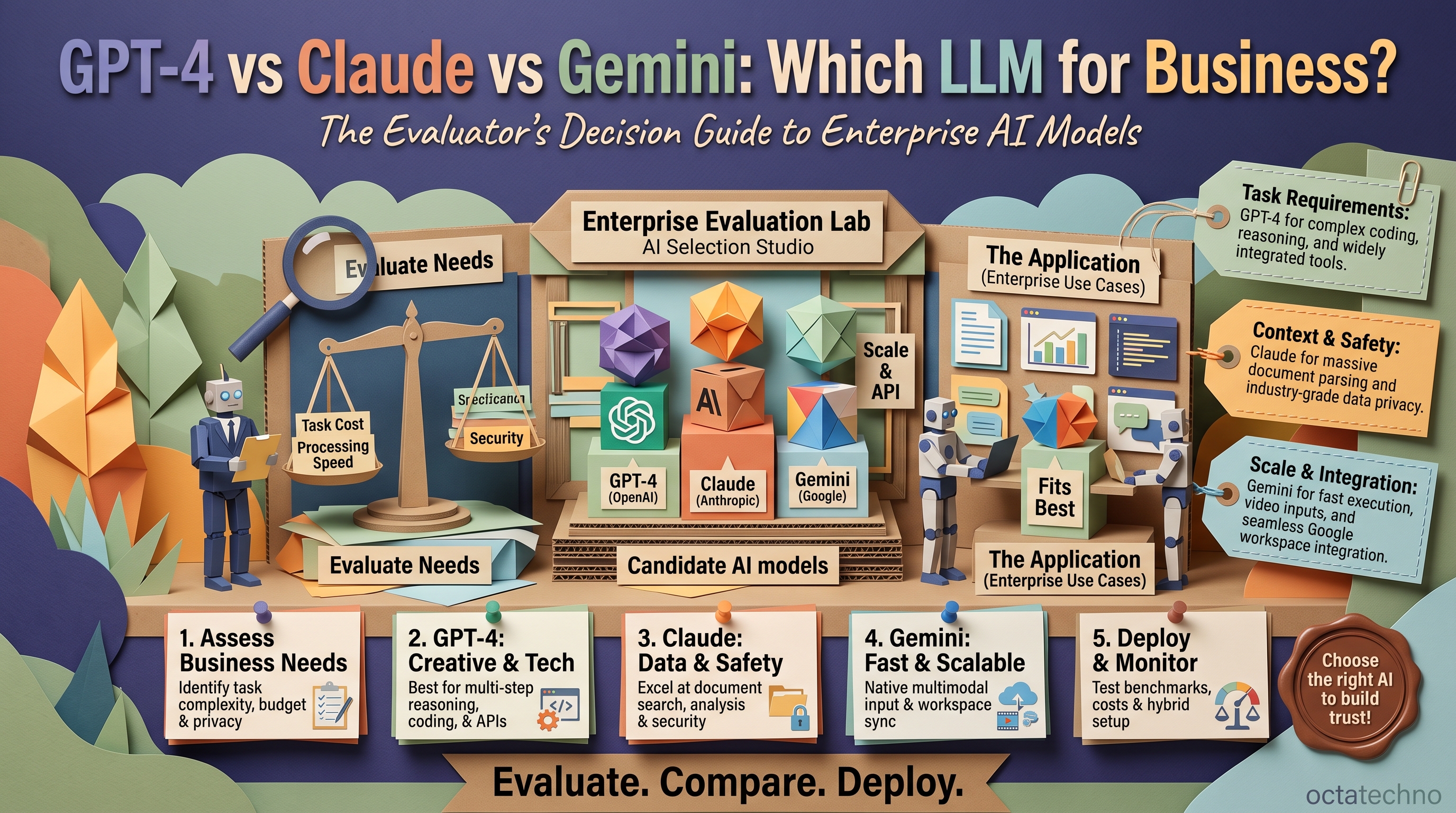
The 30-Second Verdict
All three flagship models are excellent — the differences that matter for business are cost, context window, and specific strengths. GPT-4 has the broadest ecosystem and tooling. Claude leads at long documents, careful reasoning, and writing quality. Gemini wins on price-to-performance and Google Workspace integration. Most serious teams end up using more than one.
GPT-4 (OpenAI): The Ecosystem King
Strengths: the largest integration ecosystem — nearly every AI tool, plugin, and framework supports OpenAI first. Strong function calling and tool use make it the default choice for AI agents that need to call APIs reliably. Excellent at code generation and structured outputs.
Weaknesses: premium pricing — GPT-4-class models cost significantly more per token than competitors. Context window (128k) is solid but smaller than Claude's. Data usage policies require attention for sensitive industries.
Best for: agent-based automation, code-heavy workloads, and any project where you need maximum third-party tool compatibility.
Claude (Anthropic): The Careful Reasoner
Strengths: best-in-class handling of long documents (200k+ token context), nuanced reasoning, and natural writing quality. Notably good at following complex instructions precisely and at tasks requiring judgment — contract review, detailed analysis, careful summarization. Generally the most "trustworthy" feeling output.
Weaknesses: smaller ecosystem than OpenAI, though growing fast. Can be more cautious (sometimes refusing borderline requests). Historically weaker at some code tasks, though the gap has narrowed considerably.
Best for: document-heavy workflows (legal, research, compliance), customer-facing writing, and any task where accuracy and nuance matter more than raw speed.
Gemini (Google): The Value Play
Strengths: aggressive pricing — often dramatically cheaper per token than competitors for comparable quality. Huge context windows (up to 1M+ tokens) at accessible prices. Deep integration with Google Workspace, and strong multimodal capabilities (text, image, video, audio in one model).
Weaknesses: historically a step behind on complex reasoning, though recent versions closed much of the gap. Smaller third-party ecosystem. Some enterprises hesitate over Google's data practices despite enterprise-grade controls.
Best for: high-volume workloads where cost matters (processing thousands of documents), multimodal tasks, and teams already living in Google Workspace.
Head-to-Head: What Actually Differs
- Cost per task: Gemini is typically cheapest, Claude mid-range, GPT-4 most expensive — but the gap matters most at scale. Processing 1M documents? Model choice is a budget decision. Answering 50 support chats daily? Barely matters.
- Speed: all three offer fast "mini/flash" variants for latency-sensitive tasks. For most business use, the smaller variants of any family are fast enough.
- Context window: Gemini leads on paper (1M+), Claude is excellent (200k), GPT-4 solid (128k). In practice, bigger isn't always better — retrieval quality matters more than raw window size for most RAG applications.
- Reasoning: Claude and GPT-4 trade blows on complex reasoning; Gemini is competitive but occasionally less consistent on multi-step logic.
Don't Ignore Open-Source Alternatives
The big three aren't the only game in town. Open models like Llama 3 and Mistral have become genuinely capable for many business tasks — and they run on your own infrastructure, which solves the data-privacy question completely. No data ever leaves your servers.
The trade-off is operational: you (or a partner) handle deployment, scaling, and updates instead of calling an API. For high-volume, privacy-sensitive workloads — think a bank classifying internal documents or a healthcare provider summarizing records — self-hosted open models often beat commercial APIs on total cost within months. For most companies, though, the simplicity of managed APIs wins until volume or compliance forces the issue.
How to Decide: A Practical Framework
Stop asking "which model is best?" and ask "what's the job?"
- Customer-facing chat: Claude for quality and safety, GPT-4 for tooling depth.
- Bulk document processing: Gemini for cost, Claude for accuracy-critical docs.
- AI agents calling tools: GPT-4 for ecosystem maturity.
- Internal copilots: whichever your team already uses — adoption beats marginal quality differences.
And remember: models improve every few months. Build your architecture so the model is swappable — never hard-code your business around one provider's quirks. For a deeper method, read our guide on choosing the right LLM for your use case.
What You'll Actually Pay: Three Illustrative Scenarios
Exact prices move constantly, so think in structure: you pay per input token and per output token, and output tokens cost more. Three scenarios show when model choice actually matters:
- Support chatbot, 50 conversations a day. At roughly 2,000 tokens per conversation, that's about 3M tokens a month. The cost gap between the cheapest and priciest flagship is real money monthly — but either way it's small next to one support salary.
- Invoice extraction, 5,000 documents a month. At roughly 3,000 tokens per document, you're at 15M tokens monthly. Now the per-token gap is a budget line item — the value model can cut this bill by more than half for comparable accuracy on structured extraction. This is the bread and butter of AI document processing engagements, where we benchmark all three models before committing.
- Internal copilot, 200 employees. Usage is spiky and unpredictable; per-seat AI subscriptions are often simpler to budget than API metering, and the model differences wash out against the productivity gain.
The lesson: model price matters at volume and for machine-to-machine workloads. For human-in-the-loop copilots, pick whichever your team adopts fastest.
How to Benchmark Models on Your Own Data
Public leaderboards measure general capability, not your invoices, your tickets, or your contracts. Run your own bake-off:
- Collect 50-100 real examples of the actual task — real tickets, real documents, sanitized of sensitive data. This is your golden dataset.
- Define a scoring rubric before you run anything: accuracy, format compliance, tone, and edge-case handling. Score 0-2 per dimension, not vibes.
- Run all three models blind. Same prompts, anonymized outputs, scored by the people who will live with the results.
- Score cost and latency per task alongside quality. A model that's 5% better but 3x slower and 5x pricier usually loses.
Re-run the benchmark quarterly, or whenever a major model version drops. Model rankings shuffle every few months — a decision from Q1 may be wrong by Q3.
The Routing Pattern: Using All Three at Once
The best architecture we've seen in production doesn't pick one model — it routes. A cheap, fast classifier looks at each incoming task and sends it to the right model: simple extractions and drafts go to the value model, nuanced judgment calls go to the premium reasoner, and a fallback chain retries with a stronger model if the first attempt fails validation.
In practice this looks like: a support bot drafts replies with a fast model, escalations and angry customers get the careful model, and anything touching money or legal gets the premium model plus human review. Teams running this pattern commonly report cutting inference costs by half or more versus running everything on the flagship — with better quality on the tasks that matter, because the right model handles each one.
The prerequisite is an abstraction layer: your code calls your own interface, which calls whichever model. That same layer is what makes switching providers a configuration change instead of a rewrite.
Data Privacy and Compliance: The Questions to Ask
For regulated industries, the model comparison is secondary to data handling. Ask every provider:
- Is a data processing agreement (DPA) available, and is there a zero-retention option so your data isn't stored or used for training?
- Where is data processed and stored — and is EU or regional residency available if you need it?
- For healthcare or finance, are HIPAA-eligible or equivalent compliance tiers offered, and what do they exclude?
- What happens to data in logs, caches, and abuse-monitoring systems — and for how long?
If the answers don't satisfy your compliance team, that's exactly when self-hosted open models earn their keep: no third party ever sees the data. For everyone else, the enterprise tiers of all three providers are generally sufficient — but read the DPA yourself rather than trusting the marketing page.
Mistakes Teams Make When Choosing
- Chasing benchmark scores. A two-point leaderboard lead means nothing if the model fumbles your document format. Your golden dataset beats any public benchmark.
- Hard-coding one provider. SDK calls scattered through your codebase make switching painful. Wrap every model call behind your own interface from day one.
- Ignoring latency. A ten-second response kills a chat experience no matter how good the answer. Use the mini/flash variants for anything interactive.
- Skipping the cost model. Pilot pricing on a few hundred requests tells you nothing about 5M monthly tokens. Model the production volume before you commit.
Frequently Asked Questions
Can we switch models later without rebuilding?
Yes — if you built an abstraction layer and kept prompts reasonably portable. Provider-specific features (custom tool schemas, proprietary fine-tuning) are what create lock-in, so isolate those behind your interface.
Is one model safer for customer data?
All three offer enterprise tiers with DPAs and retention controls; none is categorically "safest." The differentiator is your configuration — zero-retention settings, regional processing — and your own data hygiene, not the logo.
Do we need the most expensive model for every task?
Almost certainly not. Most production workloads split roughly 80/20: the bulk of tasks run fine on value models, and only the nuanced minority needs the flagship. The routing pattern above exists precisely for this.
Should we fine-tune or just prompt better?
Prompt first, always. Fine-tuning pays off only with high volume, stable task patterns, and a quality gap that prompting can't close. Most teams that fine-tune early discover a better prompt would have sufficed.
Need help picking and implementing the right models? Contact OctaTechno — we design multi-model AI architectures matched to your workloads and budget.