The Problem: LLMs Don't Know Your Business
Large language models are trained on public internet data. They don't know your product specs, your HR policies, your pricing, or what happened in last quarter's client meeting. Ask a raw LLM about your company and it will either say "I don't know" or — worse — confidently invent an answer. That's hallucination, and it's the #1 reason businesses can't just plug ChatGPT into their operations.
Retrieval-Augmented Generation (RAG) fixes this. Instead of relying on what the model memorized during training, RAG looks up the relevant information in YOUR documents first, then generates an answer based on what it found. The AI stops guessing and starts citing.
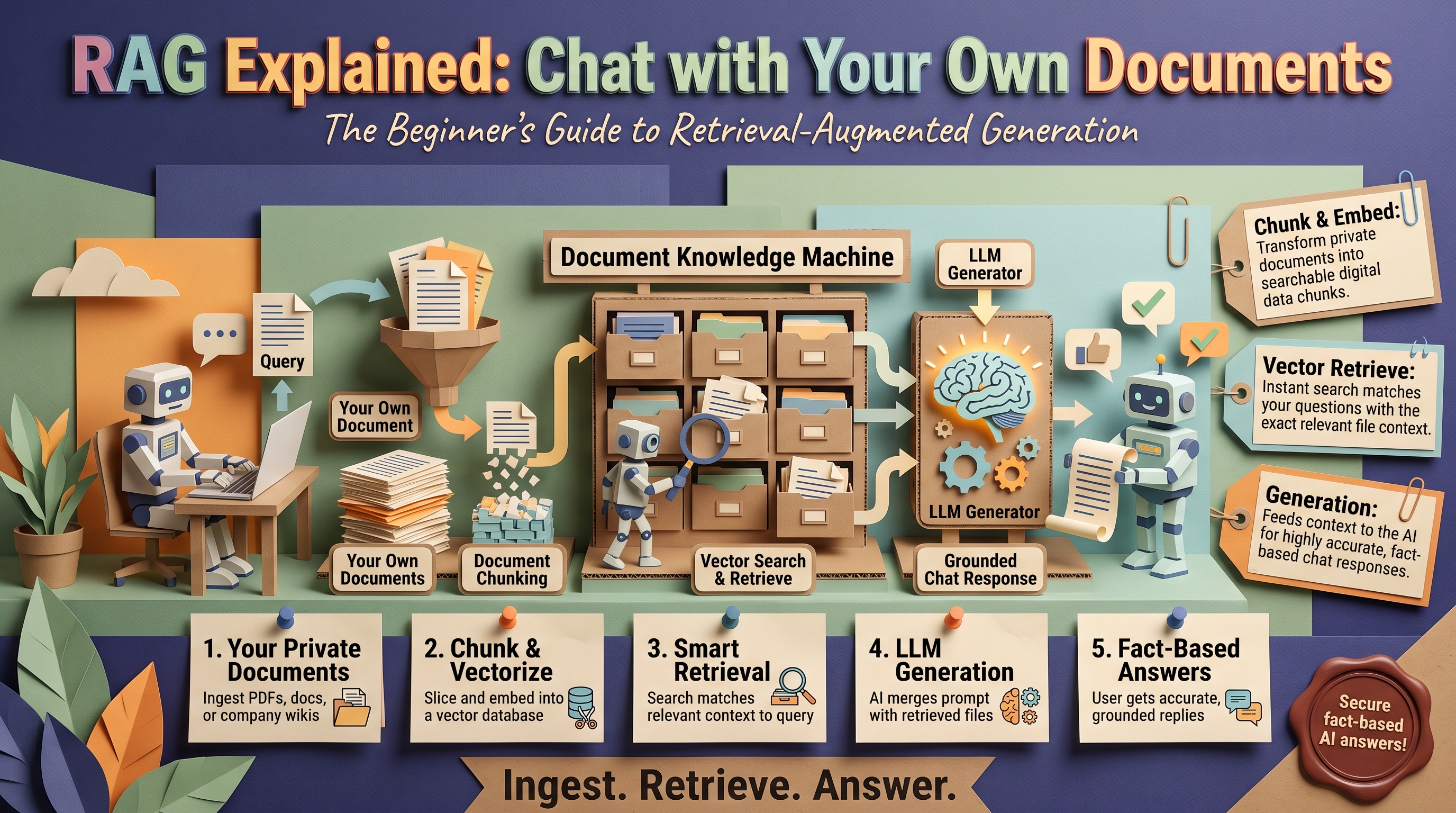
How RAG Works in 5 Steps
1. Chunk your documents
Your PDFs, wikis, and manuals are split into small passages — typically a few hundred words each. Good chunking respects natural boundaries (sections, paragraphs) so each chunk makes sense on its own.
2. Convert chunks to embeddings
Each chunk is converted into a vector embedding — a long list of numbers capturing its meaning. Similar meanings produce similar vectors, which is what makes semantic search possible.
3. Store in a vector database
Embeddings live in a specialized database (Pinecone, Weaviate, pgvector, or similar) built for lightning-fast similarity search across millions of vectors.
4. Retrieve relevant chunks at query time
When a user asks a question, it's embedded the same way, and the database returns the most semantically similar chunks — the passages most likely to contain the answer.
5. Generate the answer with context
The retrieved chunks are injected into the LLM's prompt alongside the question. The model now answers from your documents, and can cite exactly which passages it used.
RAG vs Fine-Tuning: The Short Version
Both customize AI for your business, but they solve different problems. RAG gives the model access to your knowledge — it's ideal when the answer exists in your documents. Fine-tuning changes the model's behavior — tone, format, specialized reasoning patterns. Most business applications need RAG; few need fine-tuning. We compare all three approaches in depth in our fine-tuning vs RAG vs prompting guide.
Where RAG Shines in Business
- Customer support: a chatbot that answers from your actual help docs, return policies, and product manuals — accurate, on-brand, available 24/7. See how this works in our RAG chatbot guide.
- Internal knowledge search: "What's our parental leave policy?" "How do we handle this client escalation?" — answered instantly from company docs instead of Slacking three people.
- Sales enablement: reps query battle cards, case studies, and pricing sheets conversationally during live calls.
- Compliance and legal: answers grounded in actual policy documents, with citations auditors can verify.
Build vs Buy
Off-the-shelf RAG tools (chatbot platforms with document upload) work fine for simple cases — a FAQ bot over 50 help articles. But they hit walls fast: no access control (everyone sees everything), weak retrieval on large document sets, no integration with your systems, and generic answers without your business logic.
Custom RAG — which is what we build — adds permission-aware retrieval (finance docs only for finance), hybrid search tuned to your content, integration with your CRM and ticketing, and evaluation pipelines that catch quality regressions. If the knowledge base matters to your business, the custom route pays for itself in accuracy alone.
Pitfalls That Tank RAG Projects
- Garbage chunks: RAG is only as good as your documents. Scanned PDFs with no OCR, 200-page dumps with no structure, outdated policies nobody purged — fix the source material first.
- Retrieval without evaluation: if you don't measure whether the right chunks are being retrieved, you're flying blind. Test with real questions and score the answers.
- Ignoring permissions: a support bot that leaks internal salary bands because everything was indexed together is a career-ending bug. Filter by user role at retrieval time.
- Set-and-forget: documents change; embeddings go stale. Build a re-indexing pipeline or your bot will confidently quote last year's pricing.
Walking Through a Real Query
The five steps above are the architecture. Here's what they look like on a single question — "What's our refund policy for enterprise plans?" — inside a support bot:
- Chunking (done once, at index time): your 40-page terms-of-service PDF was split into roughly 120 chunks at section boundaries. One chunk is "Section 8.3 — Enterprise refunds," cleanly self-contained.
- Embedding: the user's question becomes a vector. Because embeddings capture meaning, it matches the "Section 8.3" chunk even though the question says "refund policy" and the document says "cancellation and reimbursement."
- Retrieval: the vector database returns the top 5 chunks by similarity — the enterprise refund section, the standard refund section, and three near-misses from the billing FAQ.
- Reranking (production upgrade): a second, more precise model re-scores those 5 candidates and keeps the best 3, filtering out the near-misses. Cheap insurance against bad answers.
- Generation: the LLM receives the question plus the 3 chunks and produces: "Enterprise plans can be cancelled within 30 days for a full refund; after that, refunds are prorated quarterly [Source: Terms of Service, Sec 8.3]." The citation is what makes the answer trustworthy — and auditable.
The whole round trip typically takes 1-3 seconds. The user experiences a chat; underneath, it's search plus generation.
Chunking: The Detail That Makes or Breaks Retrieval
If RAG projects have a silent killer, it's chunking. Retrieval can only return what's in a chunk, so a bad split means the answer exists in your documents but never reaches the model.
- Size matters, both directions. Chunks of 300-800 tokens hit the sweet spot for most business content. Too small (single sentences) and the chunk lacks context — "yes, within 30 days" of what? Too large (whole chapters) and the relevant sentence drowns in noise, diluting the embedding.
- Respect structure. Split at headings, sections, and paragraphs — never mid-sentence. A chunk that starts halfway through a thought retrieves poorly and confuses the model.
- Overlap the boundaries. A 10-15% overlap between consecutive chunks keeps ideas that span a boundary intact in at least one chunk.
- Attach metadata. Every chunk should carry its source document, section title, date, and access level. Metadata powers permission filtering, freshness checks, and citations — the features that separate demos from production systems.
- Tables and lists are special. A pricing table split across two chunks is useless in both. Keep tabular content together even if it breaks your size rule — and consider converting key tables into sentence form ("The Enterprise plan costs $499/month and includes SSO"), which embeds far better.
What Production RAG Adds Beyond the Basics
The five-step version works for a demo. Systems that survive real users add four layers:
1. Hybrid search. Pure vector search is great at meaning but blind to exact terms — product codes, names, SKUs. Hybrid systems combine vector similarity with keyword search (BM25), so "What's the warranty on the XT-4500?" matches the document containing "XT-4500" even when the semantics are thin. In our experience, hybrid search alone fixes a large share of "the bot couldn't find it" complaints.
2. Reranking. Retrieve 20-50 candidates cheaply, then re-score with a precise cross-encoder model and keep the top 3-5. Two-stage retrieval is the single highest-ROI accuracy upgrade in RAG — it costs milliseconds and routinely lifts answer quality more than any model swap.
3. Query rewriting. Real user questions are messy: "it broke again, what do I do?" A rewrite step turns that into a self-contained search query using conversation history ("What are the troubleshooting steps for the XT-4500 overheating error?") before retrieval runs. Follow-up questions in a chat need this to work at all.
4. Permission-aware retrieval. Filter chunks by the user's role before the model ever sees them — finance documents only for finance, HR policies for everyone. This isn't a feature; it's a requirement. A RAG system without access control is a data-leak incident waiting for a curious employee.
These four layers are the difference between the upload-and-chat tools in the Build vs Buy section and the custom RAG systems we deploy — and they're why the accuracy numbers diverge so sharply.
How We Evaluate RAG Quality
"The bot feels accurate" is not a metric. Every RAG system we ship gets an evaluation harness with three scores:
- Retrieval hit rate: for a test set of 50-100 real questions, did the correct chunk appear in the retrieved top 5? This isolates search quality from generation quality — when answers are wrong, you need to know which half failed.
- Faithfulness: does the answer stick to the retrieved chunks, or does it embellish? We score this by checking every factual claim in the answer against the cited sources. Ungrounded claims are hallucinations, full stop.
- Freshness: after a document update, does the bot answer from the new version? We re-run the test set after every re-index to catch stale embeddings.
We run this suite before launch and after every change — new documents, model swaps, prompt tweaks. It's how we catch regressions like a model update that silently degrades citation behavior, which no amount of spot-checking would find.
RAG FAQ
How is this different from uploading files to ChatGPT?
Upload-and-chat is RAG with training wheels: no permission filtering, no freshness pipeline, generic chunking, and your documents sitting in someone else's chat session. Fine for a personal experiment; not for customer-facing or compliance-sensitive use. See the Build vs Buy section above.
Does RAG work with scanned PDFs or images?
Yes, with an OCR or vision-model preprocessing step that converts scans into text before chunking. Accuracy depends on scan quality — clean scans work well; fax-quality images need cleanup. Tables inside scanned documents are the hardest case and often need manual structuring.
How many documents do I need?
Fewer than you'd think. RAG works well with 50 documents and scales to millions. What matters is coverage and quality: a complete, current, well-structured set of 200 documents beats 20,000 stale files. Start with the documents your support team actually reaches for.
How long does a RAG project take?
A focused pilot — one knowledge base, one use case, permission-aware retrieval, evaluation harness — typically ships in 3-6 weeks. Most of that time goes to document cleanup and evaluation, not model work. The technology is the easy part; the knowledge base is the project.
Want AI that actually knows your business? Contact OctaTechno — we build production RAG systems The difference shows up in the metrics: production RAG systems we deploy typically answer 85–95% of queries correctly from company knowledge, versus 50–60% for generic upload-and-chat tools.