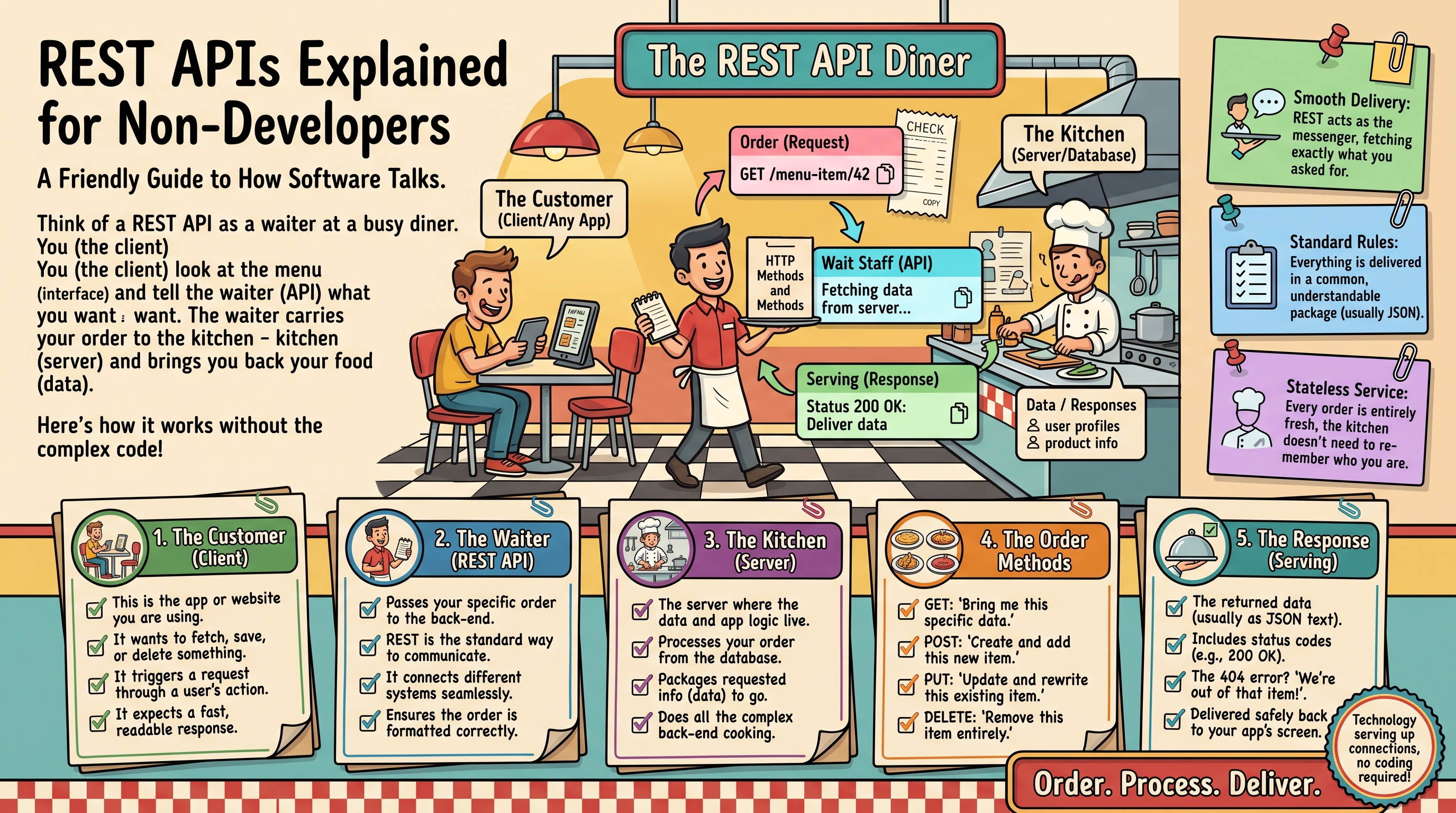
The Restaurant Analogy
Imagine a restaurant. You (the customer) don't walk into the kitchen and cook — you tell the waiter what you want, and the waiter brings it back. An API (Application Programming Interface) is the waiter between software: one app asks for something, the API delivers it, and neither needs to know how the other's "kitchen" works.
REST is simply the most common set of rules for how that waiter behaves. When someone says "REST API," they mean a waiter that follows standard conventions — which makes it predictable and easy to work with.
Endpoints: The Menu
A restaurant has a menu of dishes; an API has a menu of endpoints — specific URLs that do specific things:
GET /customers— give me the list of customersGET /customers/123— give me customer #123POST /customers— create a new customerPUT /customers/123— update customer #123DELETE /customers/123— delete customer #123
Notice the pattern: the URL names the thing, and the action word (GET, POST, PUT, DELETE) says what to do with it. These action words are called HTTP methods, and there are only a handful to learn.
Requests and Responses
Every API interaction has two halves:
The request (what you send)
"Get me customer 123" — the method (GET), the endpoint (/customers/123), and optionally some data. When creating a customer, you'd send the details:
{
  "name": "Sara Ahmed",
  "email": "sara@example.com",
  "phone": "+92-300-1234567"
}
The response (what you get back)
The API replies in a structured format — almost always JSON (JavaScript Object Notation). It looks like the example above: labeled data in curly braces. Both humans and machines can read it, which is why it won.
Responses also include a status code — a number summarizing the outcome:
- 200 — success, here's your data
- 201 — success, and I created the thing you asked for
- 400 — your request was malformed
- 401 — who are you? (authentication missing or wrong)
- 404 — that thing doesn't exist
- 429 — slow down, you're asking too fast
- 500 — something broke on our end
Authentication: Proving Who You Are
Most APIs don't serve strangers. They require proof of identity, usually an API key — a long secret string you include with each request, like a password for programs. Some use more sophisticated systems (OAuth), but the concept is the same: prove you're allowed before you get data.
Why Should a Non-Developer Care?
Because APIs are what make automation possible. When your CRM, email tool, and accounting software all have APIs, they can share data automatically — no copy-pasting, no CSV exports. Understanding the basics lets you:
- Evaluate whether two tools can be connected before buying
- Write better requirements for developers ("I need the orders API to include the customer's phone number")
- Use no-code tools like n8n or Zapier confidently — they're just friendly wrappers around these same APIs
- Understand what's possible: if it has an API, it can be automated
A Practical Next Step
Pick one tool your business depends on and search "[tool name] API documentation." Skim the endpoint list — you'll quickly see what's automatable. And if you want those connections built properly, with error handling and monitoring, OctaTechno's API integration service does exactly that. Tell us which apps you need connected.
Real-World API Examples You Already Use
- Google Maps on a restaurant website — the site calls Google's Maps API to show the location. The restaurant never built mapping software.
- "Pay with Stripe" buttons — the store sends your card details to Stripe's API, which handles the actual payment processing.
- Weather widgets — your phone's weather app calls a weather API every time you open it.
- Flight comparison sites — they query dozens of airline APIs simultaneously and display the combined results.
Every one of these is just one program's "waiter" fetching something from another program's "kitchen."
How to Read API Documentation
API docs look intimidating but follow a consistent pattern. For each endpoint you'll find:
- The endpoint URL and method — e.g.,
GET https://api.example.com/v1/orders - Required authentication — usually "include your API key in the header"
- Parameters — filters like
?status=paid&limit=50 - Example request and response — copy-pasteable JSON showing exactly what goes in and out
- Error codes — what each failure number means
Pro tip: search the docs for "quickstart" or "getting started" — most providers have a 5-minute guide that gets you a working API call fast.
Rate Limits and Pagination (Two Concepts Worth Knowing)
Rate limits cap how many requests you can make (e.g., 100/minute). They prevent abuse. If you exceed them, you get a 429 error and must slow down. Pagination means large results come in pages — "here are the first 50 of 2,000 customers, ask for page 2 for more." Both are normal; any developer building on an API handles them routinely.
REST vs. GraphQL (The 30-Second Version)
REST gives you fixed endpoints — you get what the endpoint returns, nothing more. GraphQL lets you ask for exactly the fields you want in a single query. GraphQL is more flexible but more complex; REST remains the default for most business APIs. For automation purposes, the distinction rarely matters — what matters is that an API exists at all.
Trying an API Yourself: curl and Postman
You don't need to write software to make a real API call. Two tools make it easy:
Option 1: curl (one command in your terminal)
curl is a command-line tool preinstalled on Mac and Linux (Windows users can get it via Git Bash or WSL). This one-liner fetches public data from GitHub's API — no key needed:
curl https://api.github.com/users/octocatYou'll get back a block of JSON with that user's profile. To see how authentication works, many APIs accept a key in a header:
curl -H "Authorization: Bearer YOUR_API_KEY" https://api.example.com/v1/ordersReplace YOUR_API_KEY with a real key and you've just done what a developer's code does.
Option 2: Postman (point-and-click)
Postman is a free app that turns API calls into a form:
- Create a free Postman account and start a new request.
- Set the method to GET and paste an endpoint URL, e.g.
https://api.github.com/users/octocat. - Hit Send — the response JSON appears formatted and searchable.
- For authenticated APIs, go to the Authorization tab, choose "Bearer Token," and paste your key.
Status Codes, Decoded: What Each Family Really Means
The earlier list covered the greatest hits. Here's the deeper logic, because reading status codes correctly saves hours of confusion:
2xx — Success (your side did everything right)
- 200 — success, here's your data. The default happy path.
- 201 — success, and something new was created (watch for the new object's ID in the response).
3xx — Redirection
A 301 means the endpoint moved permanently — update your saved URL. Tools and browsers handle these automatically.
4xx — Client errors (the request is the problem)
- 400 — malformed request. You sent something the API can't parse; check required fields.
- 401 vs 403 — the pair everyone mixes up. 401 means "I don't know who you are" (missing or bad credentials). 403 means "I know who you are, and the answer is no" (your key lacks permission). If you get a 401, fix your key; if you get a 403, check scopes and plan limits.
- 404 — the thing doesn't exist. Either the ID is wrong or it was deleted.
- 422 — the format was fine, but the content failed validation (e.g., "email is already taken"). Stripe uses this heavily.
- 429 — rate limited. Look for a
Retry-Afterheader telling you how many seconds to wait, then retry with backoff.
5xx — Server errors (their problem, but you still have to cope)
- 500 — something broke on their end. Retry once; if it persists, it's a bug to report.
- 502 / 503 — the service is down or overloaded. Implement retries with exponential backoff (wait 1s, then 2s, then 4s) rather than hammering it.
Golden rule: 4xx means fix your request, 5xx means wait and retry, 429 means slow down.
API Versioning: Why the /v1 Matters
Notice how endpoints often start with /v1/ or /v2/? That's versioning. APIs evolve — fields get renamed, endpoints get retired — and versions let providers change things without breaking every integration overnight.
What this means for you as a non-developer:
- Build on the latest stable version, but ask your developer which version they're targeting — integrations pinned to old versions eventually stop working.
- Read the changelog when a provider announces a new version. The breaking changes are listed there, usually with a migration deadline.
- Sunset dates are real. When an API says v1 shuts down on December 31, it shuts down — put it in your calendar the day you read the notice.
Finding Hidden APIs Behind Any Website
Here's a trick most people don't know: many websites are just pretty faces on top of APIs. You can see the raw data feed with your browser's developer tools:
- Open any data-heavy page (a product listing, a job board, a dashboard).
- Press F12, open the Network tab, and reload the page.
- Filter by "Fetch/XHR" — you'll see the API calls the page itself makes, often returning clean JSON.
This is gold for automation planning: if the website's own frontend pulls from api.example.com/v1/products, that endpoint likely exists for you too — check the public docs. Two cautions: undocumented endpoints can change without notice, and using them may violate the site's terms of service.
Mini-Project: Build a Live Weather Dashboard (No Coding)
Let's put it all together with a 15-minute project. You'll pull live weather data through a real API and display it in a Google Sheet:
- Go to wttr.in — a free weather API that needs no key. Try
https://wttr.in/Lahore?format=j1in your browser to see raw JSON. - In a Google Sheet, use
=IMPORTDATA("https://wttr.in/Lahore?format=%t")to pull just the current temperature into a cell. - Change the city name in the URL for each row to build a multi-city dashboard.
- Set the sheet to refresh hourly (File → Settings → Calculation → recalculation every hour).
You just consumed a REST API: a GET request, a JSON response, no code. Now imagine the same pattern with your CRM's API pulling live pipeline data every morning — that's the leap from demo to business value, and it's exactly what our AI workflow automation service builds for clients.
FAQs
Q: Do I need to learn programming to work with APIs?
A: No. Reading documentation, testing calls in Postman, and designing workflows in no-code tools like n8n all require zero code. You only need a developer when you're building custom software on top of an API — and even then, understanding the concepts makes you a far better client.
Q: What's the difference between an API and a webhook?
A: An API is how you ask an app for something; a webhook is how an app tells you something happened. APIs are request/response ("give me the orders"); webhooks are event-driven ("a new order just arrived"). Our webhooks vs polling guide breaks down when to use each.
Q: How much does API access cost?
A: Most business APIs are free up to generous limits — hundreds or thousands of calls per day. Costs kick in at high volume or for premium data, so check the pricing page's API section before designing a workflow around an API.
Q: What does "RESTful" mean?
A: It's the adjective form — a "RESTful API" follows REST conventions. Vendors use the label loosely, so judge by the docs and status-code behavior, not the label.
Turning API Knowledge into Automation
Here's the practical payoff: once you understand that every app with an API is connectable, you start seeing automation opportunities everywhere. That manual weekly export? Replaceable. That copy-paste between systems? Replaceable. Tools like n8n wrap these APIs in a visual interface — our implementation team can have your first integrations running in days. Tell us which apps you use and we'll map what's possible.