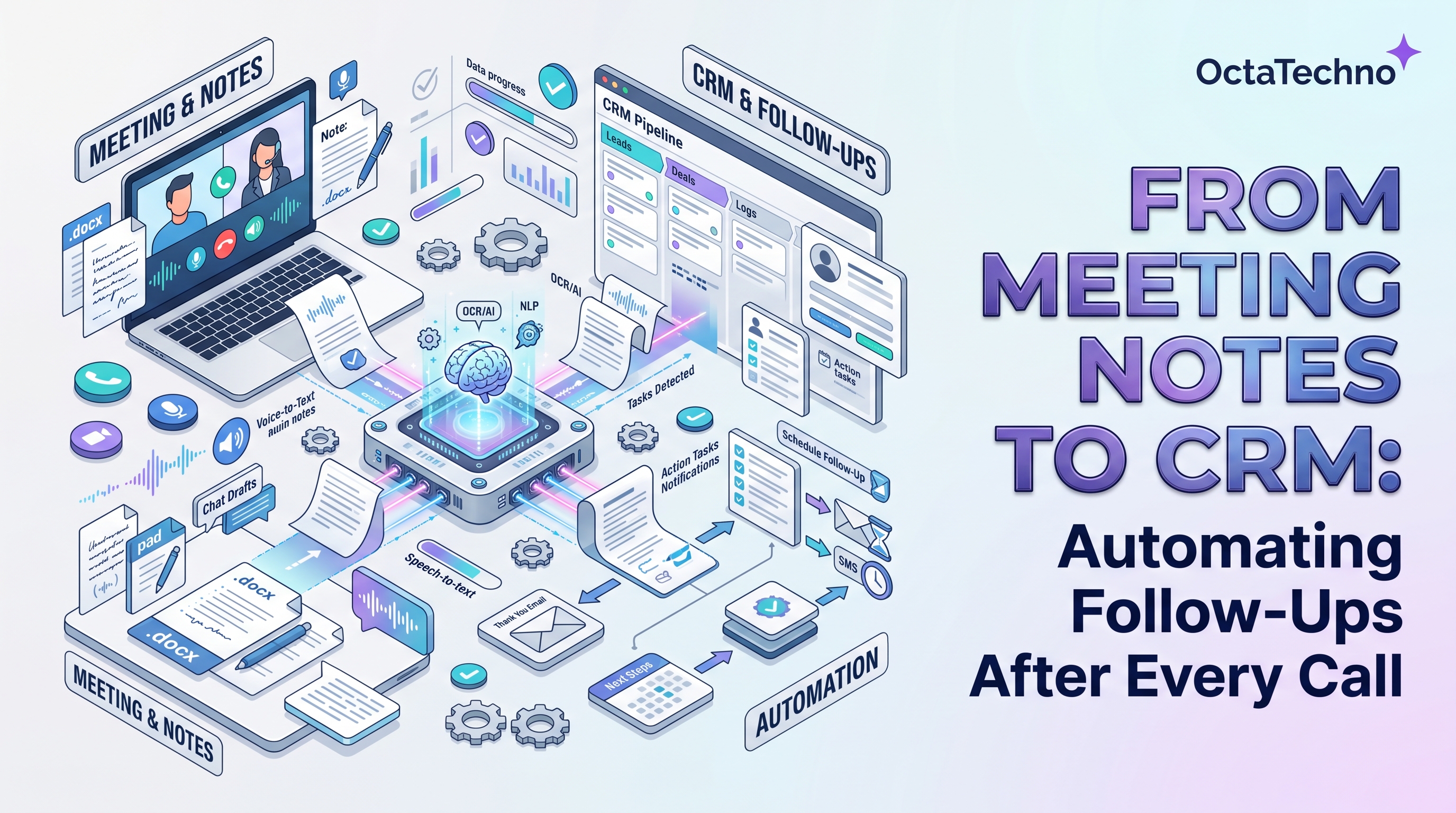
The call ends. Everyone agrees on next steps. Then the notes sit in a document nobody reopens, the CRM still shows the deal in its old stage, and the promised follow-up email goes out three days late — or never. This post-call black hole is one of the most common and most fixable leaks in any sales or service operation. The fix is a single automation: every meeting transcript becomes CRM updates, assigned tasks, and drafted follow-ups, automatically.
What falls through the cracks
After a typical discovery call, at least five things need to happen: the CRM record needs updating, action items need owners and dates, the follow-up email needs writing, the next meeting needs scheduling, and the deal stage may need to move. In practice, reps do two of the five from memory, usually the same day if you are lucky. The rest decays. Multiply by twenty calls a week and you have a pipeline built on good intentions instead of information.
The deeper problem is that note-taking competes with listening. A rep frantically typing during a call is a rep not fully present with the customer. So the choice has always been presence or documentation — until automation removed the trade-off.
The automation, end to end
Here is the pipeline that leading teams run after every call:
1. Capture the transcript
Record calls through your meeting platform or dialer — Zoom, Teams, Meet, or a sales-specific tool. With proper consent notice, transcription is automatic and timestamped, including speaker labels.
2. AI extracts what matters
A language model reads the transcript and pulls out the structured essentials: key decisions, action items with implied owners, dates and deadlines mentioned, budget or timeline signals, risks and objections raised, and overall sentiment. The output is a tight summary plus machine-readable fields — not a wall of text.
3. The CRM updates itself
Those structured fields flow into the right records automatically: the deal stage advances when the conversation warrants it, new contacts from the call are created, notes attach to the timeline, and custom fields like budget or decision date get filled. Through our custom API integrations service, this works even with CRMs that lack native AI features.
4. Tasks appear with owners and due dates
Every action item becomes a task assigned to the right person with the date mentioned on the call. 'Send the security questionnaire by Thursday' is no longer a line in a doc — it is a task in the owner's queue on Thursday morning.
5. The follow-up email drafts itself
Within minutes of the call ending, the rep gets a draft follow-up in their inbox: a recap of what was discussed, the agreed next steps, and the proposed time for the next meeting. They review, tweak, and send — a two-minute job instead of a twenty-minute one.
Building it step by step
Start with one call type — discovery calls are ideal because they are frequent and structured. Connect your meeting platform to a transcription service, then route transcripts through an AI step that outputs a fixed schema: decisions, actions, dates, risks, sentiment. Map each schema field to your CRM once, and test for two weeks with a single rep before rolling out. The most common early fix is prompt tuning: the first version of the extraction prompt always misses something your team considers obvious, so iterate on real calls.
Handling the edge cases
Real calendars are messier than the happy path. Group calls with multiple stakeholders need speaker-aware extraction so action items land with the right owners — verify speaker labels during your pilot, because misattribution is the most common early bug.
No-shows should trigger a different branch: a polite reschedule email instead of a recap of nothing.
Internal meetings usually should not touch the CRM at all; route those to your project tool instead.
And calls that go off-script — a support issue raised inside a sales call — need a triage rule so the right team gets the task, not just the rep. None of these are hard; they just need to be designed rather than discovered.
Budget extra attention for the extraction schema. The fields you choose — and the exact wording of the prompt that fills them — determine everything downstream. Start with a minimal schema of five or six fields and add more only when the CRM actually uses them. Every field nobody reads is prompt complexity you pay for on every single call.
Keeping humans in control
Two guardrails make this trustworthy. First, review before send: AI drafts follow-ups but never sends them — the rep always approves. Second, CRM updates are logged, not silent: every automated field change appears in the record timeline with its source, so anyone can audit what the automation did and correct it. Teams that start with these guardrails build confidence fast; teams that skip them spend months rebuilding trust after the first mistake.
What good looks like
Measure three things. Follow-up speed: time from call end to sent follow-up should drop from days to under an hour. CRM freshness: the share of calls with same-day record updates should approach one hundred percent. Slippage: count the action items from a sample of calls and check how many became completed tasks — that ratio is the true measure of whether your pipeline runs on memory or on system.
When every call automatically becomes updated records, owned tasks, and timely follow-ups, your team stops losing deals to forgetfulness. Our AI workflow automation service designs exactly this pipeline around your meeting stack and CRM. Book a discovery call and we will map what the post-call flow should look like for your team.